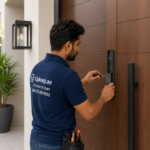




Smart locks are becoming one of the most practical home security upgrades across the UAE. From apartments in Dubai to villas in Abu Dhabi, homeowners are choosing smarter access control for better convenience, flexibility, and security.
A common question many residents ask is whether they can install a smart lock without a technician UAE or if professional installation is necessary.
The good news is yes—many smart locks are designed specifically for DIY installation.
However, success depends heavily on your door type, lock compatibility, and choosing the right smart lock model. UAE homes often use different locking systems, so preparation matters.
If you want to install a smart lock without a technician UAE, this practical guide will walk you through the process.
Can You Install a Smart Lock Yourself?
Yes—but not every smart lock is equally DIY-friendly.
Some models are designed to fit over existing lock systems with minimal modification, while others require full replacement, drilling, or advanced setup.
If your goal is to install a smart lock without a technician UAE, choosing a beginner-friendly lock is the first step.
DIY installation works best when:
- Your existing lock is compatible
- Your door uses standard hardware
- No wiring is required
- Instructions are simple and clearly labeled
Check Door Compatibility First
This is the most important step.
Most failed installations happen because homeowners skip compatibility checks before purchase.
If you plan to install a smart lock without a technician UAE, inspect your current setup carefully.
Common UAE Door Types
Residential properties commonly use:
- Wooden apartment doors
- Metal security doors
- Mortise lock systems
- Euro cylinder locks
- Multi-point locking systems
Not every smart lock supports every configuration.
Door Thickness
Smart locks support specific door thickness ranges.
Measure your door before buying.
A mismatch can make installation impossible.
Lock Type
Some smart locks replace only internal hardware.
Others require complete lock replacement.
Know exactly what type of lock you currently have.
Door Opening Direction
Some smart lock systems require configuration based on whether your door opens inward or outward.
This matters during setup.
Tools You May Need
If you want to install a smart lock without a technician UAE, gather your tools first.
Common essentials include:
- Screwdriver set
- Measuring tape
- Allen keys
- Pencil for marking
- Smartphone for app setup
- Fresh batteries
- Small drill (if required)
If you choose a retrofit smart lock, drilling may not be necessary.
Choose a DIY-Friendly Smart Lock
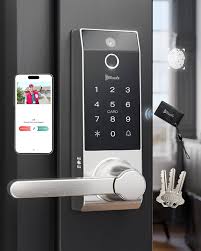
Not all smart locks are beginner-friendly.
Look for features that simplify installation.
Good DIY-friendly features include:
- Retrofit installation
- App-based setup guidance
- Minimal drilling
- Reversible door compatibility
- Battery-powered operation
- Clearly labeled hardware parts
If you are new to smart lock installation, avoid overly complex commercial systems.
How to Install a Smart Lock Without a Technician UAE
Here’s the practical process.
Step 1: Remove Existing Interior Hardware
Most DIY smart locks replace the inside section of your current lock.
Use a screwdriver to remove:
- Interior mounting screws
- Thumb turn assembly
- Existing cover plates
Keep removed hardware organized.
If something feels stuck, stop and inspect rather than forcing parts.
Step 2: Inspect the Existing Lock
Before installation, test your current lock.
Check for:
- Sticky movement
- Bolt misalignment
- Loose hardware
- Resistance during turning
A smart lock cannot fix a faulty mechanical lock.
Fix existing issues first.
Step 3: Install the Mounting Plate
Most smart lock kits include a mounting bracket.
Install it where the previous interior hardware sat.
Ensure:
- Holes align correctly
- Wiring (if included) routes properly
- Plate sits flush against the door
Avoid overtightening screws.
Too much pressure can cause misalignment.
Step 4: Attach the Smart Lock Unit
Now mount the main smart lock body.
Depending on the model, this may slide, click, or screw into place.
Check for smooth fitment.
If the locking motor feels strained, reposition the unit.
Step 5: Insert Fresh Batteries
Most smart locks use AA batteries or rechargeable packs.
Install batteries carefully.
Check:
- Correct polarity
- Secure battery compartment closure
- Startup lights or audio prompts
Weak batteries often create unnecessary setup problems.
Step 6: Connect the Mobile App
Most smart locks require app pairing.
Download the manufacturer’s official app and follow setup instructions.
Typical setup includes:
- Creating an account
- Enabling Bluetooth
- Detecting the smart lock
- Pairing the device
- Naming the lock
- Configuring admin access
Use strong login credentials.
Step 7: Test Manual Operation
Before relying on smart features, test basic mechanical performance.
Check:
- Smooth locking movement
- Proper door closure
- No grinding sounds
- Fast response time
If anything feels wrong, fix alignment first.
Step 8: Configure Smart Features
Once the lock works properly, enable advanced features.
Examples include:
- PIN codes
- Fingerprint access
- Guest access
- Auto-lock timers
- Notifications
- Remote access
Start simple and expand settings gradually.
Common DIY Installation Mistakes
If you want to successfully install a smart lock without a technician UAE, avoid these common mistakes.
Ignoring Compatibility
This is the biggest reason DIY installs fail.
Misalignment
Even slight errors can prevent smooth locking.
Weak Batteries
Always begin with fresh batteries.
Skipping Manual Testing
Never assume app setup means installation is correct.
Forcing Components
If parts do not fit naturally, something is wrong.
UAE-Specific Considerations
Apartment Building Rules
Some apartment communities restrict visible modifications.
Always check building policies before drilling or replacing hardware.
Metal Security Doors
Metal doors may require specialized tools.
DIY installation becomes more difficult here.
High Temperature Conditions
UAE heat can impact electronic devices over time.
Choose smart locks designed for warmer climates.
When DIY Is Not the Best Option
DIY installation makes sense if:
- Your lock is retrofit compatible
- Instructions are straightforward
- Your door setup is simple
- No major hardware changes are needed
Professional help may be better if:
- Your door uses multi-point locking
- Metal drilling is required
- Existing hardware is damaged
- Wiring is involved
- Building compliance matters
Final Thoughts
If you want to install a smart lock without a technician UAE, it is absolutely possible with the right preparation.
For standard apartment doors and DIY-friendly smart lock models, installation is manageable even for beginners.
The key is choosing compatibility first, following instructions carefully, and testing everything properly.
A correctly installed smart lock improves convenience, access control, and modern home security—without paying extra installation costs.